Best Gaming Accessories and Tools for an Ultimate Gaming Setup
September 26, 2026 | by admin

10 Best Gaming Accessories and Tools for an Ultimate Gaming Setup
Building a great gaming setup is about more than having a powerful PC or the latest console. The right gaming accessories can improve comfort, performance, audio quality, organization, and the overall experience.
Whether you’re a casual gamer, competitive player, or someone who enjoys long gaming sessions, investing in the right tools can make your setup more comfortable and functional.
Here are 10 of the best gaming accessories and tools to consider for your gaming setup.
1. Gaming Mouse
A gaming mouse is one of the most important accessories for PC gamers. Compared with a standard mouse, gaming mice are designed with features such as adjustable DPI, programmable buttons, improved sensors, and ergonomic shapes.
For competitive games such as FPS and MOBA titles, a responsive mouse can provide precise control and quick movements.
When choosing a gaming mouse, consider its sensor performance, weight, button layout, grip style, and whether you prefer a wired or wireless connection.
2. Mechanical Gaming Keyboard
A mechanical keyboard can provide a more responsive and satisfying typing experience than many conventional keyboards.
Mechanical switches are available in different types, offering different levels of actuation force, sound, and feedback. Gamers can choose between linear, tactile, and clicky switches depending on their preferences.
Many gaming keyboards also feature RGB lighting, programmable keys, dedicated media controls, and customizable software.
For gamers who spend a lot of time playing or typing, a mechanical keyboard can be a worthwhile addition to the setup.
3. Gaming Headset
Good audio can make a major difference in gaming. A gaming headset allows players to hear footsteps, environmental sounds, dialogue, and other important audio cues while communicating with teammates.
Look for features such as comfortable ear cushions, a clear microphone, surround or spatial audio support, and good noise isolation.
Wireless gaming headsets can also provide a cleaner setup by eliminating another cable from your desk.
4. Large Gaming Mouse Pad
A large mouse pad provides enough surface area for both your mouse and keyboard while creating a consistent surface for mouse movement.
Extended mouse pads are especially useful for gamers who use low sensitivity settings and require larger mouse movements.
Besides functionality, a high-quality mouse pad can also help protect the surface of your desk and give your gaming setup a more cohesive appearance.
5. Gaming Monitor
The monitor is one of the most important components of a gaming setup because it directly affects what you see while playing.
Important specifications include refresh rate, response time, resolution, panel technology, adaptive sync support, and screen size.
Competitive gamers may prioritize high refresh rates and low response times, while players who enjoy single-player games may prefer higher resolution and better image quality.
Choose a monitor based on the games you play and the performance capabilities of your computer.
6. Gaming Controller
A gaming controller can be a useful addition even if you primarily play on PC.
Controllers are particularly convenient for racing games, sports games, platformers, fighting games, and many third-person titles.
A controller can also provide a more relaxed gaming position compared with a keyboard and mouse.
When choosing one, consider compatibility, button layout, wireless connectivity, battery life, and ergonomics.
7. Gaming Chair
Comfort becomes increasingly important during long gaming sessions. A gaming chair or ergonomic chair can provide support for your back, arms, and neck.
Instead of choosing a chair purely based on its gaming appearance, pay attention to adjustable features such as seat height, armrests, backrest angle, and lumbar support.
A comfortable chair can make your gaming environment much more enjoyable while also helping you maintain a consistent sitting position.
8. USB Hub
Modern gaming setups often include multiple peripherals, including keyboards, mice, headsets, controllers, webcams, microphones, and external storage devices.
A USB hub can provide additional ports and make it easier to connect your accessories.
For gaming laptops and compact PCs with limited connectivity, a USB-C hub can be especially useful.
Before buying one, check the required USB standards and power requirements of the devices you intend to connect.
9. Gaming Desk
A dedicated gaming desk can help bring all your equipment together in an organized workspace.
Look for a desk with enough surface area for your monitor, keyboard, mouse, speakers, and other accessories. Cable-management openings and trays can also help keep wires organized.
Some gaming desks include features such as headphone hooks, cup holders, monitor mounting compatibility, and adjustable height.
The best desk is ultimately one that provides enough space for your equipment while fitting comfortably into your room.
10. RGB Gaming Lighting
Lighting can dramatically change the atmosphere of a gaming room. RGB light strips, monitor backlights, and smart gaming lights can add ambient illumination around your desk.
RGB lighting can also be synchronized with games, music, or other devices depending on the product.
However, lighting doesn’t have to be complicated. Even a simple LED strip behind your monitor can create a more immersive gaming environment.
How to Choose the Best Gaming Accessories
You don’t need to purchase every gaming accessory at once. Start with the equipment that will have the biggest impact on your experience.
If you play competitive PC games, prioritize a gaming mouse, mechanical keyboard, gaming headset, and high-refresh-rate monitor.
If you prefer console or controller-based games, a comfortable controller, gaming headset, and suitable gaming display may be more important.
For gamers who spend many hours at their desk, investing in a comfortable chair and spacious gaming desk can make a significant difference.
Finally, consider compatibility. Check whether accessories work with your PC, PlayStation, Xbox, Nintendo Switch, or other gaming platform before purchasing.
Final Thoughts
The right gaming accessories can transform a basic setup into a more comfortable and enjoyable gaming environment. From essential peripherals such as a gaming mouse and mechanical keyboard to upgrades such as RGB lighting and a USB hub, each accessory can serve a specific purpose.
Instead of buying everything at once, identify the weaknesses in your current setup and upgrade them one at a time.
A great gaming setup doesn’t necessarily require the most expensive equipment. The best accessories are the ones that match your games, hardware, playing style, and personal preferences.

- 96% Layout Aluminium Gasket Mount Mechanical Keyboard: YUNZII AL98 PRO full aluminum metal gaming keyboard adopts 96% 18…
- Dual 8K Gaming Keyboard : AL98 PRO Gaming keyboards are pushing dual 8000Hz polling rates for ultra-low latency, a spec …
- Tri-Mode Connectivity & Long-Lasting Battery Life: The AL98 PRO mechanical gaming keyboard supports seamless 2.4G wirele…

- The next-generation optical HERO sensor delivers incredible performance and up to 10x the power efficiency over previous…
- Ultra-fast LIGHTSPEED wireless technology gives you a lag-free gaming experience, delivering incredible responsiveness a…
- G305 wireless mouse boasts an incredible 250 hours of continuous gameplay on just 1 AA battery; switch to Endurance mode…
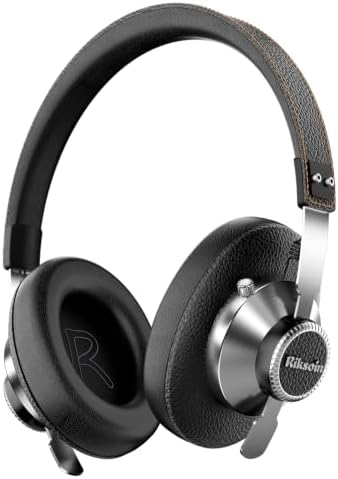
- Active Noise Cancellation: Our headphones feature advanced Active Noise Cancellation (ANC) technology, immersing you in …
- High-Resolution Audio: Our headphones deliver studio-quality sound, providing a powerful and immersive audio experience….
- 40H Battery Life & Fast Charging: Say goodbye to frequent charging hassles. Enjoy up to 40 hours of battery life in Acti…
RELATED POSTS
View all